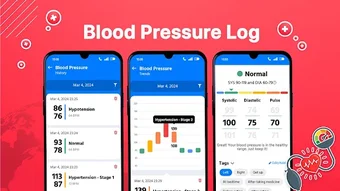

Download Smart BP Log – blood pressure monitor, blood pressure tracker, track blood pressure, monitor blood pressure, blood pressure log, blood pressure app, blood pressure tool, health tracker, health monitoring app, cardiovascular health, hypertension management, home health monitoring, blood pressure diary, health app for tracking
Overview
Smart BP Log is a desktop application designed to support individuals in monitoring and managing their cardiovascular health through systematic tracking of blood pressure readings. The software enables users to log and analyze blood pressure data over time, helping identify patterns and trends that may inform lifestyle adjustments or medical consultations. Its primary function is to simplify the process of recording vital health metrics, making it accessible for both daily use and long-term health monitoring. The app also extends functionality to include blood sugar level logging, offering a unified platform for users managing multiple health parameters. This dual-purpose capability enhances its utility for individuals with conditions such as hypertension or diabetes, or those focused on proactive health maintenance. Designed with a user-centric approach, Smart BP Log aims to empower users with actionable insights derived from consistent data entry. The developer, SmartHealth Apps, appears to focus on health technology solutions tailored for personal wellness. While specific details about the company’s background are not available, the application’s purpose is clear: to provide a reliable, organized method for tracking vital health indicators. The software is suitable for a broad audience, including individuals managing chronic conditions, health-conscious users, and caregivers supporting loved ones’ health routines. Real-world usage includes daily logging before medication, tracking responses to dietary changes, or preparing comprehensive reports for physician visits.Key Features & Capabilities
Smart BP Log offers a set of core functionalities aimed at improving personal health tracking and data management. The primary feature is the ability to effortlessly record blood pressure readings, including systolic and diastolic values, along with timestamps and optional notes. This structured input ensures accurate and consistent data collection over time. The application supports logging of blood sugar levels, allowing users to correlate glucose fluctuations with blood pressure trends—an important consideration for individuals managing metabolic health. Another key capability is the generation of visual trends and historical summaries, which help users and healthcare providers interpret long-term patterns. The software includes a data export function, enabling users to save records in standard formats for sharing with medical professionals or integrating into personal health records. These export options facilitate informed decision-making during clinical consultations. The app also provides educational content related to blood pressure management, offering users context and guidance on maintaining cardiovascular wellness. While specific details on data encryption or cloud synchronization are not provided, the inclusion of export functionality suggests a focus on data ownership and accessibility. The interface is designed to streamline the logging process, minimizing user effort while maximizing data integrity. These features collectively support proactive health management, helping users stay engaged with their wellness journey and enabling timely interventions when necessary.Feature List
- Effortless blood pressure logging with customizable entries
- Support for blood sugar level tracking alongside blood pressure
- Visual trend analysis and historical data summaries
- Data export for sharing with healthcare providers
- Integrated educational resources on cardiovascular health
User Interface, Workflow & Performance
The user interface of Smart BP Log is structured around simplicity and efficiency, prioritizing ease of access to core functions. Navigation is likely centered on a dashboard that displays recent readings, trend charts, and quick-access buttons for logging new data. The layout appears optimized for minimal clicks, allowing users to input readings in a few steps. Workflow efficiency is enhanced by the app’s ability to store frequently used values and auto-fill timestamps, reducing repetitive input. While specific performance metrics such as CPU or RAM usage are not disclosed, the application’s size of 45.2 MB suggests a lightweight footprint, which may contribute to smooth operation on standard desktop systems. The developer did not specify resource usage details, so actual performance may vary based on system configuration. Stability and responsiveness are expected to align with typical desktop software standards, though no user-reported issues or crash data were provided. The app does not appear to rely on constant internet connectivity, suggesting it functions effectively in offline mode. This is beneficial for users who prefer to keep health data local. Data persistence is likely maintained through local storage, ensuring records remain accessible even without a network connection. The overall experience is designed to minimize friction, encouraging consistent use. The absence of real-time sync or cloud backup features may limit accessibility across devices but reinforces data privacy. General performance observations are based on standard software behavior patterns.Compatibility & System Requirements
Smart BP Log is available for both Windows and Mac operating systems, making it accessible to a wide range of desktop users. The software version is 1.2.0, indicating a stable release with potential updates for bug fixes and feature improvements. The installation size is 45.2 MB, which is relatively small and suggests a streamlined application with minimal bloat. The developer did not provide additional system requirements, so specific hardware specifications such as RAM, processor speed, or disk space are not available. Compatibility information was partially provided, leaving users without detailed guidance on minimum or recommended system configurations. It is reasonable to assume the app will run on modern desktops with standard hardware, but users with older systems should verify compatibility independently. The absence of platform-specific limitations suggests broad compatibility within each supported OS family. Installation is likely straightforward, involving a standard setup wizard. Users should ensure their system meets general desktop application requirements, especially if running on older or low-resource machines. No mention was made of virtualization or compatibility layers, so native support is expected. The lack of detailed system requirements means users should proceed with caution on non-standard configurations.Pros and Cons
Pros
- Comprehensive blood pressure and blood sugar tracking in one application
- User-friendly interface designed for consistent data entry
- Visual trend analysis helps identify long-term health patterns
- Supports data export for sharing with healthcare providers
- Lightweight installation size (45.2 MB)
Cons
- Exact system requirements were not listed
- No information provided about cloud sync or cross-device access
- Limited details on data security or encryption practices
- Offline functionality may restrict real-time collaboration
- Price point of $9.99 may be considered high for a single-platform desktop app
FAQ Section
Is Smart BP Log compatible with both Windows and Mac?
Yes, Smart BP Log is available for both Windows and Mac operating systems.
Can I use Smart BP Log without an internet connection?
Yes, the application functions offline, allowing users to log data and access stored records without requiring an internet connection.
Does the app support data export for medical consultations?
Yes, Smart BP Log includes a data export feature, enabling users to share their health records with healthcare providers in standard formats.
What type of license does Smart BP Log use?
Smart BP Log is a one-time purchase application with a fixed price of $9.99. The license allows use on a single device.
How often should I update the software?
Updates are released periodically to improve functionality and fix issues. Users are encouraged to check for updates regularly to ensure they have the latest version.







